FarStone Total Backup Recovery Workstation9.2
Publisher Description
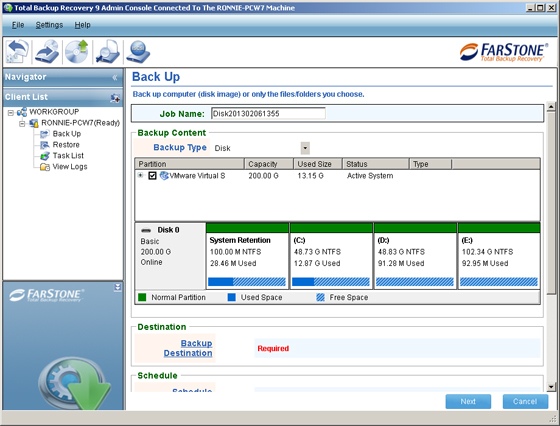
Total Backup Recovery Workstation 9
Trusted PC Backup, Data Protection and System Restore - Since 1993
FarStone Total Backup Recovery is a Trusted PC Backup, System Restore, and Disk Cloning Solution. Total Backup Recovery backup entire hard drive & partitions, selected files & folders, or only the changes on daily, weekly or monthly schedule automatically. Total Backup Recovery supports all latest hardware systems, including UEFI/EFI, GPT, Raid, 2/3/4 TB HDD and SSD.
Supports Windows 8, 7, Vista, XP
Key Features:
Easy to use One-click Backup & Restore
Backup Files, Windows or entire hard drive
Full, Increment, and Differential Backup
Convert to VMware & Hyper-v
Local & Remote Backup
Password & Encryption
Email Notification
Preview Files in Backup Image
Universal/Dissimilar Restore
Quota Management
Pre/Post Backup Command
Powerful Pre-OS Tools
Disaster File Rescuer in Pre-OS
UEFI/GPT Backup
RAID (soft and hard) Backup
Large Drive (4TB or bigger) Backup
Backup in Windows and Pre-OS
Clone Windows and drive in Pre-OS
Windows Password Reset in Pre-OS
Data/Disk Shredder
Defrag in Backup
Exclude Windows Temp & Unnecessary Files in Backup
Backup & Restore to iSCSI directly
Support Multiple Backup Schedules
Support Windows 8 new REFS File System
About FarStone Total Backup Recovery Workstation
This Backup & Restore program is available in English. It was last updated on 29 September, 2026. FarStone Total Backup Recovery Workstation is compatible with the following operating systems: Windows.
The company that develops FarStone Total Backup Recovery Workstation is FarStone Technology Inc. The latest version released by its developer is 9.2. This version was rated by 1 users of our site and has an average rating of 5.0.
The download we have available for FarStone Total Backup Recovery Workstation has a file size of 573.6 MB. Just click the green Download button above to start the downloading process. The program is listed on our website since 2013-09-06 and was downloaded 299 times. We have already checked if the download link is safe, however for your own protection we recommend that you scan the downloaded software with your antivirus. Your antivirus may detect the FarStone Total Backup Recovery Workstation as malware if the download link is broken.
How to install FarStone Total Backup Recovery Workstation on your Windows device:
- Click on the Download button on our website. This will start the download from the website of the developer.
- Once the FarStone Total Backup Recovery Workstation is downloaded click on it to start the setup process (assuming you are on a desktop computer).
- When the installation is finished you should be able to see and run the program.
Program Details
System requirements
Download information
Pricing
Version History
version 9.2
posted on 2013-09-06
- Enhanced Central Management Console
- One-click Backup & Recovery
- Backup 2TB, 3TB, 4TB+
- Incremental, Differential and Complete Backup
- Support UEFI-based PC/Server Backup, Cloning and Imaging
- GPT and Dynamic Disk PC/Server Backup, and Cloning
- VMware and Hyper-v P2V V2P Support
version 8.3
posted on 2012-09-11
- Enhanced Central Management Console
- One-click Windows Backup & Recovery
- Support UEFI-based PC/Server Backup, Cloning and Imaging
- GPT and Dynamic Disk PC/Server Backup, Imaging and Cloning
- VMware and Hyper-v P2V V2P Support
